The field values on an existing records vanish or empty after applying “Apply all formulas on this sheet to all saved records” and using action button like “Convert Records” or a JS Workflow. Is there any why this is happening?
Sample Image:
The field values on an existing records vanish or empty after applying “Apply all formulas on this sheet to all saved records” and using action button like “Convert Records” or a JS Workflow. Is there any why this is happening?
Sample Image:
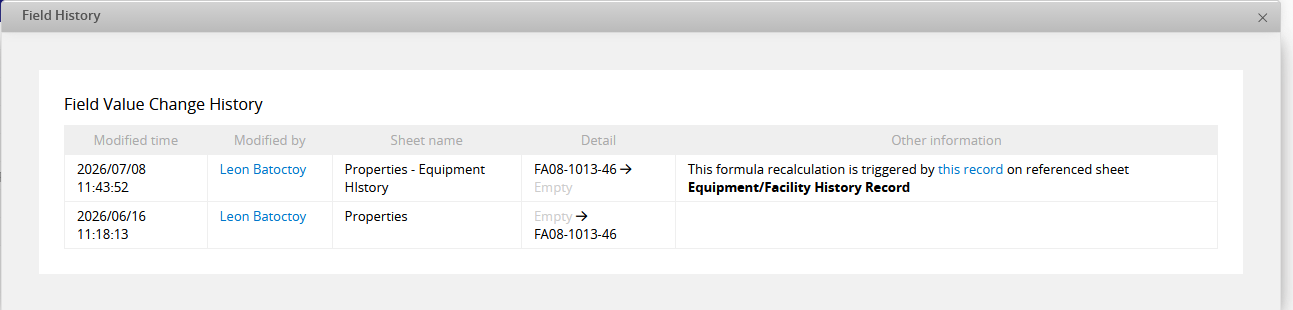
Hi, thanks for including the Field History screenshot — that’s exactly the right place to trace this kind of issue.
From the log, there’s one important piece of information – this field is shared between “Properties” and “Properties - Equipment History.” Looking at the “Other information” column, the value on “Properties - Equipment History” was cleared because a formula recalculation was triggered by an associated record on “Equipment/Facility History Record” — so the trigger came from that referenced sheet, not from someone editing this record directly.
This pattern is consistent with a known scenario in Ragic where a shared field (same Field ID) across more than one sheet or interface gets overwritten if a formula or Link and Load recalculation fires on one side while the settings differ on the other — details and prevention tips are in this article.
That said, we can’t confirm this is what’s happening in your case without seeing the actual configuration, so it’s worth ruling in or out before assuming it’s the cause. Since you’ve already got the Field History pulled up, the next step would be comparing this field’s formula settings between “Properties” and “Properties - Equipment History” in Design Mode to see whether they’re actually configured in a way that would produce the same results from either sheet.
If they turn out to match and the value still clears unexpectedly, that would point toward something else going on — in that case, feel free to email us at support@ragic.com with:
That’ll let us take a closer look and rule out other possibilities, including whether this is expected behavior or not.