Soliciting Signatures into a Sub-table

Need a public (EVERYONE) sign-in form where users select a company from a drop-down menu, and then sign their signature against employee list of names that exist in a sub-table on another sheet. We do not want to duplicate employee rows or require login. Is there any supported way to expose sub-table rows to public users for selection and editing?

The sign-in form the employee has access to should work like this:

  1. Select their Company from a drop-down menu (which then pulls a list of all the employees for that company, which is in a sub-table on another sheet);
  2. The employee locates their name from the list.
  3. The employee taps in the signature field next to their name and signs their name.
  4. Once the sign-in form is submitted, the signature updates in the sub-table in the Ragic sheet.

Currently, there’s no way to link & load info from sub-tables. Is there a remedy to how to create such a sign-in sheet?

Hi Chad,

I want to make sure I’m picturing the workflow correctly before suggesting a solution. Regarding step 4, could you clarify the intended data flow?

  • Updating the Master List: Are you looking for the employee to write their signature directly back into the original subtable on your master Company/Employee sheet?
  • Creating a New Entry: Or is this more like an event registration? In this scenario, the ‘Sign-in’ form would reference the master list to pull names, but the signature would be saved onto the sign-in record itself, leaving your original employee list untouched.

Knowing which path you’re taking will help me suggest the most practical remedy within Ragic’s current capabilities.

Hi, Kate! Thanks for your response for clarification. I’m looking for the first option: “Updating the Master List”. I’d like for the signature to be put directly back into the original sub-table on the master employee sheet. Looking forward to your response.

Hi Chad,

Thank you for confirming that you’d prefer the signature to be written directly back into the master employee list.

Before we dive into the technical configuration, there are a few logistical considerations regarding public access and data integrity that I’d like to clarify. Since this setup involves allowing public users to modify a master record, understanding your exact process will help ensure the solution is both secure and sustainable.

1. User Identity and Verification

Because the form would be accessible to the EVERYONE group (public) without a login requirement, the system cannot automatically verify the identity of the person filling it out.

  • Clarification needed: How do you plan to ensure that the correct person is signing against the correct name? In a public-access scenario, there is a risk that a user could accidentally (or intentionally) select and edit a signature field belonging to a different employee.

2. Information Visibility

To allow a public user to find their name within a subtable on a master sheet, they generally need to be able to view the data within that record first.

  • Clarification needed: What specific information should be visible to the public when they access this form? For example, would you be comfortable with any user being able to see the full list of employees for a company before they select their own name to sign?

Once I have a bit more detail on these points, I can better assess if there is a feasible approach from a system perspective. Clearer insight into your intended workflow will allow me to determine if we can align these requirements with Ragic’s capabilities while ensuring your data remains protected.

Hi, Kate:

To answer your questions…

  1. For the purpose of this sign-in sheet, there really is no security issue involved since the employees will only be “signing-off” that they have completed a training. The actual training program will be housed in an LMS that employees will have to log-in to do the training course - this will be the way to verify whether or not the employee actually completed the course (however, the LMS doesn’t allow for signatures). The sign-off sheet is a document we must keep on file and would be easiest to use Ragic since this is where the employee lists are already stored.

  2. For this purpose, it is only one Company with many stores / branches, that will be accessing the information. The only information needed on the sign-sheet will be Last Name, First Name, and Employee #. My plan is to create an entire new sheet for each company with only this information that employees can access (rather than the “master parent” sheet). I hope that makes sense.

I appreciate your concern about security, but for what I’m needing, there really isn’t a security risk involved, other than like you said, an employee could accidentally or intentionally sign for another employee. But from our end, this isn’t a major concern. Thanks!

Hi Chad,

Thank you for providing those details. Since you have determined that the lack of identity verification and the risk of accidental data entry are acceptable for this specific use case, we can look at the technical configuration required to achieve your goal.

If you would like to move forward with updating your master list directly via a public form, the following setup is the most direct way to achieve that within Ragic. Please keep in mind that this approach relies on the specific workflow you’ve described, so you’ll want to be comfortable with how it handles data history and the open nature of public editing.

Technical Configuration Steps

1. Expand the Master List On your master list, use the New Sheet from Subtable feature. This converts your subtable employee rows into individual records on a new sheet (e.g., “Employee Details”). This is necessary because you cannot “target” a specific subtable row for an update from another sheet without it being its own record.

2. Configure the Sign-in Sheet To bring the list of employees into your Sign-in form dynamically, set up the Loading All Subtable Data Based on a Linked Independent Field feature. When a company or branch is selected, this will automatically populate the subtable with the corresponding names.

3. Expand the Sign-in Subtable On your Sign-in sheet, use the New Sheet from Subtable feature again to create a sheet we’ll call “Signature Details.” This allows each sign-in row to act as a standalone entry point for the signature.

4. Bridge the Data Back to the Master On the “Signature Details” sheet, set up Update Value on Another Sheet. Configure it to update the “Employee Details” sheet created in Step 1. You must establish rules to ensure the signature maps to the correct person (e.g., matching “Branch”, "Employee First Name, and “Employee Last Name” at the same time). You can also enable the Advanced Setting to have this action run automatically upon saving.

Recommended Workflow

To make this functional for public users, instead of having every employee create a new sign-in record, I recommend pre-defining the sign-in records for each branch. For example, if you have 10 branches, create 10 records in your Sign-in sheet. Each record will automatically load the associated list of employees.

Employees should then access the “Signature Details” sheet directly. On this sheet, they can use Filters to find their specific branch and name, then click into the record to leave their signature.


Critical Considerations

Before implementing this, please be aware of the following structural consequences:

  • The Overwriting Issue: By updating the Master List directly, you are essentially treating a transactional event (signing for a specific training) as a permanent attribute of the employee, similar to their ID or Date of Birth. This creates a weak logical link because the Master List will only ever display the most recent activity. While Ragic’s record history tracks changes made to the signature field, it functions as a system log for manual auditing rather than a structured report. Consequently, when users review the Master List, the specific context of how and when the signature was left remains unclear, which can complicate long-term data management.
  • Security and Data Pollution: Since this is a public (EVERYONE) form, there is no barrier preventing a user from modifying the signature of any other employee. Because this updates your master list directly, any accidental or intentional errors will immediately “pollute” your primary source of employee data.

I hope this setup provides a helpful starting point for your training sign-off process. Given the specific constraints of your workflow and the data structure involved, this should allow you to bridge that information back to your master list as requested.

Best of luck with the implementation and the upcoming training sessions!
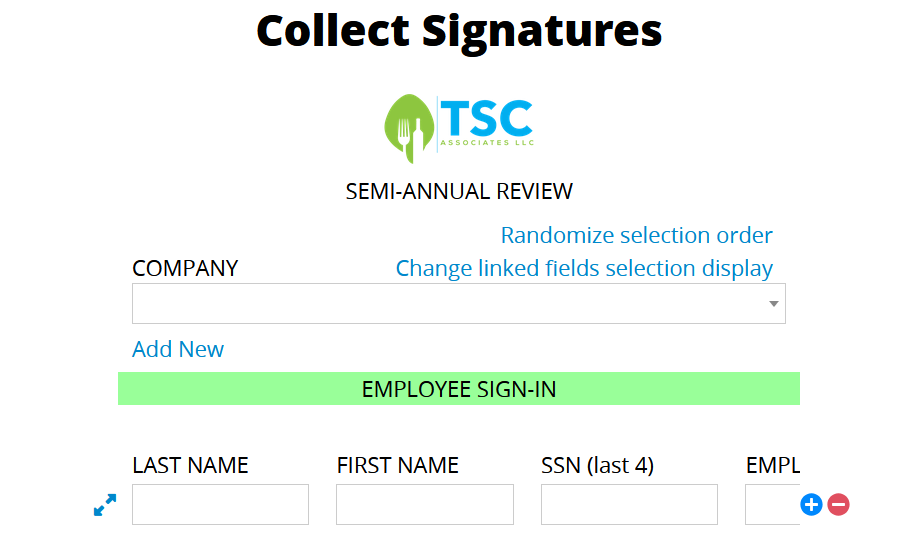
Hi, Kate! I’m so close to getting this to behave as I want. The issue I’m running into now is, on the “Sign-In” sheet that the employees will have access to (remember, they will select which store/branch where they work, and then the Sign-In sheet will auto-populate all of the employees from that store/branch; the employee will locate their name and then sign next to it), as you can see from the screenshot of the public/everyone Sign-In sheet, it only populates one employee on only one row. If I share the “raw URL”, then they can see every employee after selecting which store/branch where they work - but this isn’t as “clean” of a format, especially on mobile devices, which is what most employees will be using to sign-in.

Is there something I’m missing for when I share the Data Collection URL? Maybe I need to set it up to where the employee 1) selects their store/branch, then 2) they will need to select their name from a dropdown, too?