If a sheet has two (2) or more identical subtables (for example: one for current employees and a second for terminated employees), it would be a nice feature when the employee’s status is changed from “current” to “terminated” in the status column of the subtable, the employee’s information from the “current employees” subtable is automatically moved to the “terminated employees” subtable, and vice-versa.
Currently, the only way to move an employee from one subtable to another is to cut & paste, then delete the empty row(s) that you’re left with in the subtable. This is very time consuming.
Thanks for your consideration if this is even a possibility!
suggestion you can do it all in a same subtable, the current and the terminated employees, and when you need to know the amount of each one you put a filter, you could also put two additional fields that do not belong to the subtable, one that is called “current” and another that is called “terminated” and depending on the information of the subtable, that in each of them it sums you the total of each corresponding category.
As Robert mentioned, the simplest approach is usually to keep both current and terminated employees in the same subtable. With a status field, you can easily filter or summarize by category without needing to move rows back and forth.
That said, if you’d still like to maintain two separate subtables, Ragic already provides ways to do this efficiently. You can select multiple fields at once, copy, and paste them into the other subtable. Here’s a quick guide that explains how: Selecting multiple fields at once for operations.
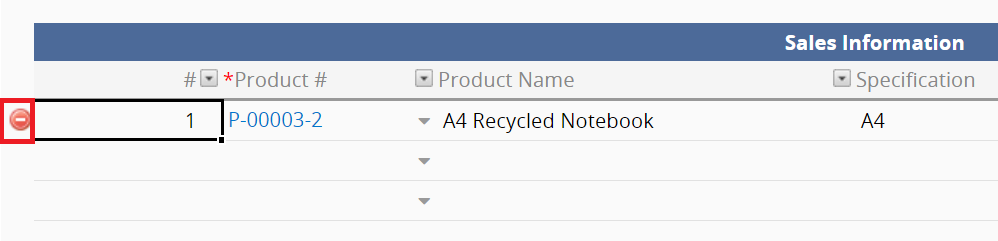
To remove any unused rows afterward, simply click the delete icon on the left:
Whether you use one subtable or two, you can set things up without needing additional features—it’s just a matter of choosing the workflow that’s most convenient for you. Be sure to check the links above to explore each feature in more detail. Hope this helps!
Thanks for the information. I am currently copying & pasting the multiple cells and moving the data between the two (2) separate subtables, then deleting the empty cells (one-by-one which is often very time consuming because, for some reason, it takes a while for the delete to occur). The reason I have two (2) separate subtables is for generating monthly employee reports; the report only needs to show “current” employees and not those who are “terminated”. In the past, I have sorted by the employee “status” column, but that doesn’t prohibit terminated employees from showing up on the report, which created another step having to delete those employees from the report before printing / filing. I’m looking for a quick method of entering entering employees into the database, being able to quickly change their status, and printing a report of only those employees I need to appear on the report (from the subtable). There are multiple statuses for employees: current, terminated, transferred, and furloughed. If you have any advice on how to generate reports from a subtable and be able to hide / omit certain status types from that report, it would be appreciated. Thanks!
Hi Chad - thanks for sharing more details on your use case. That’s helpful. May I understand what kind of report you’re currently using? What format you’re hoping to export the report in? E.g., PDF, Excel, etc.